














Australia, New Zealand & Pacific Islands
Copyright © 2016 Toshiba Corporation. All Rights Reserved.

(2026 Buyer's Guide) Current as at June 2026. Any prices mentioned are provided as general market context only and do not constitute a Toshiba quotation.
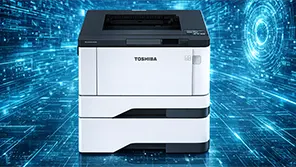
First, a clarification. The term "MFP" is often used loosely. A home or small-office A4 printer handles A4 pages and suits low print volumes. A business-class A3 multifunction printer (MFP) is a different category of device, offering printing, copying, scanning and faxing, support for A3 paper sizes, higher duty cycles and faster print speeds, and is designed to be shared across a workgroup.
The decision is primarily about paper size and print volume:
Most A3 multifunction printers also print A4 documents faster and more economically than smaller desktop A4 devices.
For many growing Australian businesses, an A3 colour MFP is the more future-proof choice.
Print speed is measured in pages per minute (ppm). As a guide, review your current print volumes and add approximately 15% headroom for future growth.
As a general market guide, business A4 colour MFPs typically range from several hundred dollars to approximately $2,500 for commercial desktop models. Business A3 colour MFPs commonly start around $3,000 to purchase or approximately $75–$190 per month to lease.
The difference is not simply about paper size. A3 devices are engineered for higher duty cycles, shared use, advanced finishing and lower running costs at volume.
A useful rule of thumb is that once three or more people share a device, or monthly print volumes exceed 2,000–3,000 pages, an A3 business MFP often becomes the more economical long-term solution.
Conversely, if you only require A3 output occasionally—perhaps fewer than 50 A3 pages per month—an A4 device combined with outsourced large-format printing may be the more cost-effective option.
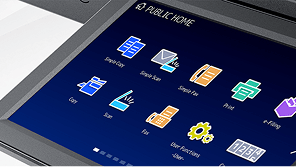
Toshiba's e‑STUDIO A3 colour range spans compact workgroup devices through to high-volume departmental systems. Models such as the e‑STUDIO2021AC, e‑STUDIO3525AC and e‑STUDIO5525AC deliver 1200 x 1200 dpi output, integrated security features and access to Toshiba's print management and document capture solutions.
This allows organisations to standardise print infrastructure across multiple locations while maintaining a consistent user experience.
If you are unsure which device class best suits your requirements, Toshiba Australia can conduct a print assessment based on actual usage volumes and provide recommendations on the most appropriate purchase or leasing option.
An A4 printer handles pages up to A4 and suits lower print volumes. A business-class A3 multifunction printer (MFP) also prints, copies and scans, supports paper sizes up to A3, operates at higher speeds and duty cycles, and is designed to be shared across a workgroup. Many A3 MFPs also offer advanced finishing options such as stapling and booklet-making.
Not necessarily. However, A3 MFPs typically print A4 documents faster and at a lower cost per page than smaller desktop A4 devices, while also providing the flexibility to produce A3 documents when required. If your print volumes are growing or the device will be shared across a team, an A3 MFP is often the more future-proof choice.
Match the device speed to your monthly print volume. As a general guide, 20–25 ppm suits a small workgroup, 30–35 ppm suits a standard shared office, and 45 ppm or higher is recommended for busy offices and departments. Review your current monthly print count and allow approximately 15% headroom for growth.
Not usually. Business-class A3 MFPs often deliver a lower cost per page than compact A4 printers due to higher-yield toner cartridges and lower maintenance overheads. On a serviced print plan, monochrome pages can cost as little as 1–3 cents per page. The most significant factor affecting running costs is typically the ratio of colour to monochrome printing.